






CrowdSec WAF on Kubernetes
Had a project where some APIs needed to be public with no authentication. That's a security risk, so we needed a WAF.
I looked at a few options. CloudFlare and AWS WAF charge per request, which gets expensive fast. CrowdSec is open-source and comes with community threat intelligence. Went with CrowdSec.
This post documents the three integration issues I hit and how I fixed them.
CrowdSec components
CrowdSec has a distributed architecture with four pieces:
LAPI is the central brain. It stores ban decisions, provides an API for queries, and syncs with community threat feeds.
The Agent is the detective. It reads logs, parses attack patterns, and reports bad IPs to LAPI.
AppSec is the real-time inspector. It analyzes HTTP payloads looking for SQL injection, XSS, and similar attacks.
The Bouncer is the security guard. It sits in front of your app (nginx in my case) and checks every request against LAPI before letting it through.
I like the separation between detection and enforcement. You can scale each part independently.
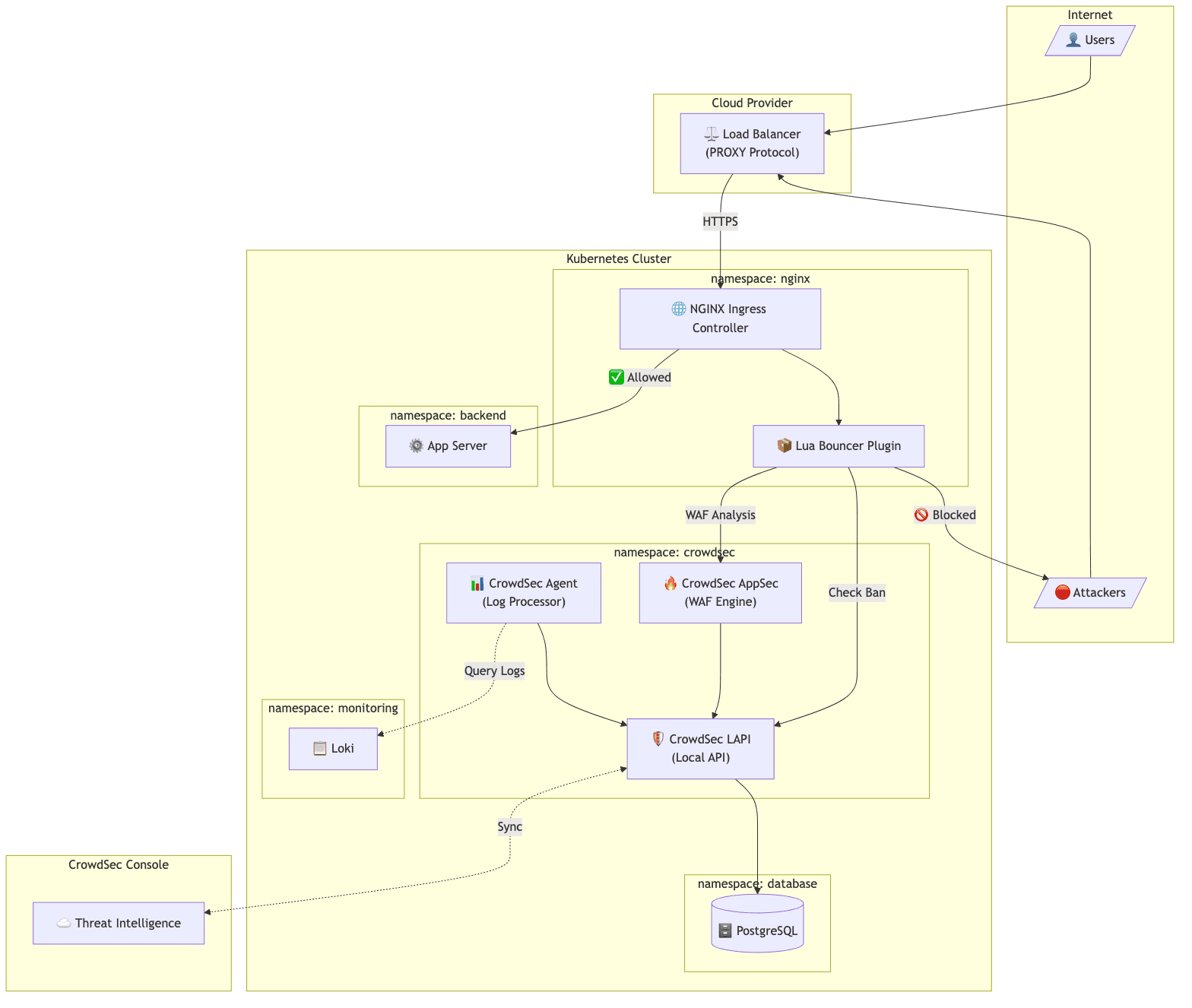
Traffic flow
Normal request:
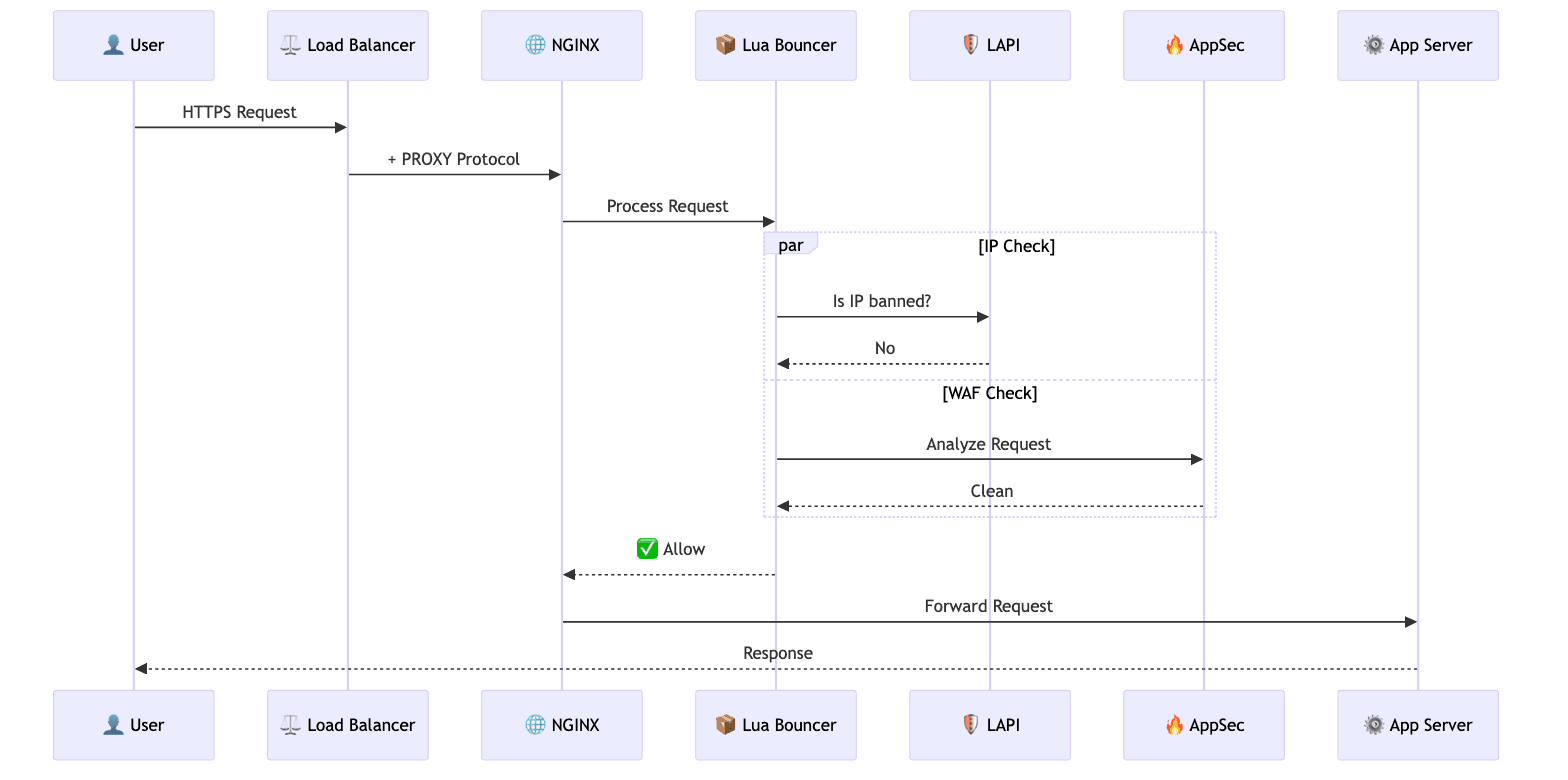
- Request hits nginx
- Lua bouncer checks LAPI: "is this IP banned?"
- AppSec checks the request payload for attacks
- Both pass, request goes to the backend
Blocked attack:
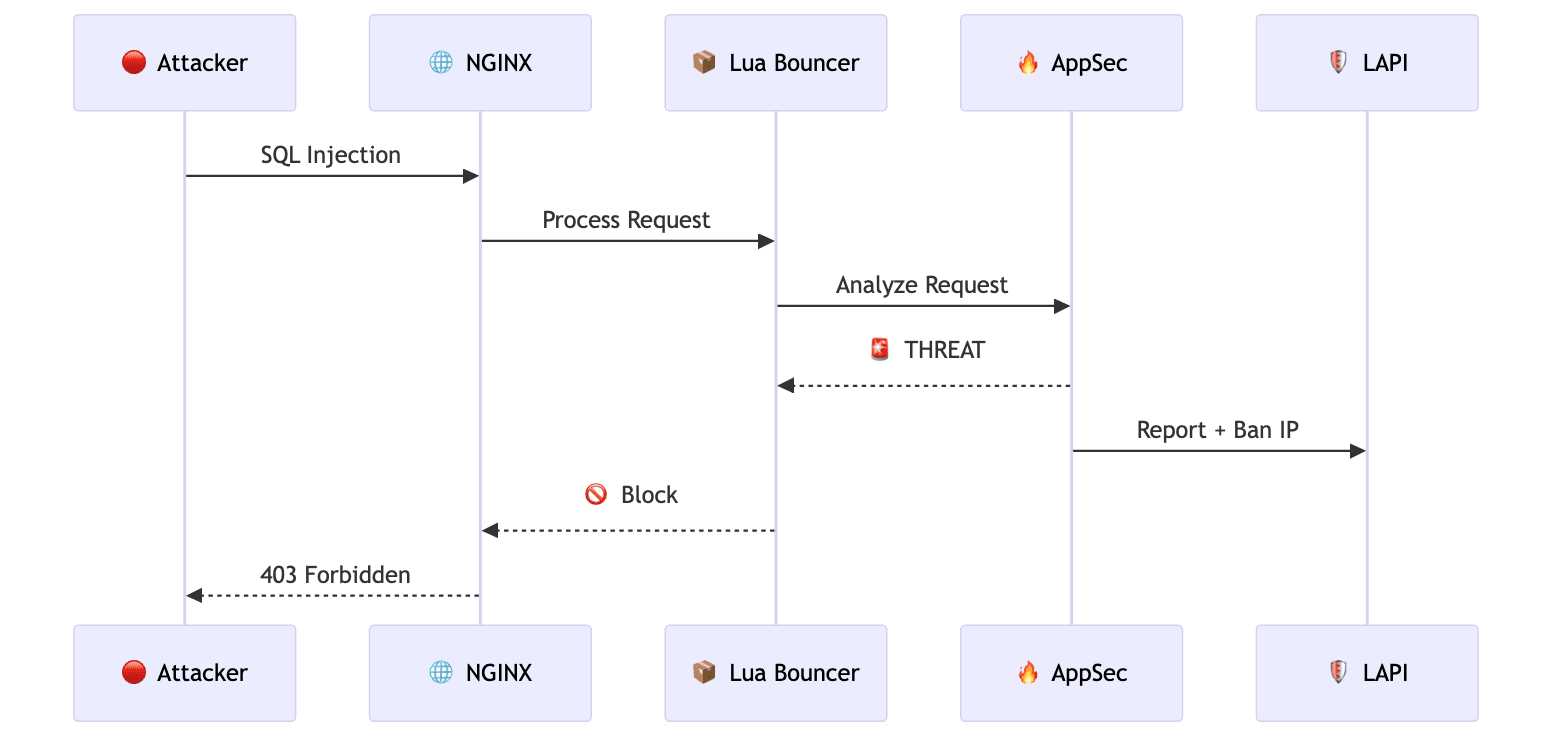
- Request hits nginx
- AppSec detects SQL injection in the payload
- Reports to LAPI, IP gets banned
- Returns 403 to the attacker
- Future requests from that IP get blocked immediately
Issue 1: PostgreSQL StatefulSet not created
CrowdSec docs recommend PostgreSQL for production instead of the default SQLite. I used Zalando postgres-operator.
Created the PostgreSQL CR in the crowdsec namespace. Nothing happened. Operator logs showed:
{"cluster-name":"crowdsec/crowdsec-postgres","msg":"pod disruption budget ... created"}
{"cluster-name":"crowdsec/crowdsec-postgres","msg":"defined CPU limit 0 for postgres container is below required minimum"}
Then silence. No StatefulSet, no pods.
I tried restarting the operator, adding resource limits, adding optional fields. None of it helped.
Fix
Moved PostgreSQL to the postgres-operator namespace:
apiVersion: "acid.zalan.do/v1"
kind: postgresql
metadata:
  name: crowdsec-postgres
  namespace: postgres-operator  # was: crowdsec
spec:
  preparedDatabases:
    crowdsec:
      defaultUsers: true
      secretNamespace: crowdsec  # credentials still go to crowdsec ns
StatefulSet appeared immediately.
I still don't know the root cause. Some namespace permission issue with the operator. Moving to the operator's own namespace fixed it, so I moved on.
Issue 2: Wrong IP in logs
Ran pentests after deployment. CrowdSec Console showed all attacks coming from the same IP, which was the load balancer's internal IP. Not the actual attacker IPs.
Our setup: Hetzner LB with PROXY Protocol enabled.
controller:
  config:
    use-proxy-protocol: "true"
  service:
    annotations:
      load-balancer.hetzner.cloud/uses-proxyprotocol: "true"
PROXY Protocol was configured. But the wrong IP still appeared.
Root cause
I had use-forwarded-headers: "true" in the nginx config. This tells nginx to trust X-Forwarded-For headers.
The problem: Hetzner's LB sets X-Forwarded-For to its internal IP. When both PROXY Protocol and use-forwarded-headers are enabled, nginx prioritizes X-Forwarded-For over the PROXY Protocol header. So it was picking up the wrong one.
Fix
Removed use-forwarded-headers:
controller:
  config:
    use-proxy-protocol: "true"
    compute-full-forwarded-for: "true"
    # use-forwarded-headers: removed
After this change, actual client IPs showed up correctly. This one was annoying to track down.
Issue 3: Agent not collecting logs
The default CrowdSec Agent runs as a DaemonSet. It mounts /var/log from the host and reads container logs directly.
Agent pods started fine but collected zero logs.
The problem: containerd writes logs to /var/log/pods/<namespace>_<pod-name>_<uid>/<container>/. The UID is different every time a pod restarts. Pattern matching on those paths doesn't work reliably.
Fix
We already had Loki for centralized logging. So I switched the Agent to pull logs from Loki instead:
agent:
  isDeployment: true
  hostVarLog: false

  additionalAcquisition:
    - source: loki
      url: "http://loki-distributed-query-frontend.monitoring:3100"
      query: '{namespace="nginx-public", container="controller"}'
      labels:
        type: nginx
        program: nginx
The Agent becomes a Deployment instead of a DaemonSet. It queries Loki for logs instead of reading from disk.
Nice bonus: resource usage dropped about 67%. A DaemonSet runs on every node. A Deployment runs one pod.
PostgreSQL config
LAPI config for the PostgreSQL backend:
config:
  config.yaml.local: |
    db_config:
      type: postgresql
      user: crowdsec_owner_user
      password: "${DB_PASSWORD}"
      db_name: crowdsec
      host: crowdsec-postgres.postgres-operator.svc.cluster.local
      port: 5432
      sslmode: require
Password comes from a Secret created by postgres-operator.
One thing to note: switching from SQLite to PostgreSQL requires re-registering machines and bouncers. With auto_registration enabled, just restart the Agent and AppSec pods and they'll register themselves.
Verification
Ran pentests again after fixing all three issues.
This time:
- Attacker IPs appeared correctly in Console
- Attack requests got 403 responses
- IPs showed up in the LAPI decision list
- Subsequent requests from banned IPs were blocked immediately
WAF working as expected.
What I learned
-
If postgres-operator silently fails to create a StatefulSet, try deploying in the
postgres-operatornamespace withsecretNamespacepointing to wherever you actually need the credentials. -
PROXY Protocol and X-Forwarded-For conflict. If you're using PROXY Protocol, don't set
use-forwarded-headers: true. -
If you already have centralized logging (Loki, etc.), use it as the CrowdSec Agent's log source. Simpler than hostPath mounts and uses fewer resources.
-
SQLite is fine for testing. PostgreSQL gives you persistence and can scale horizontally.